
 2017 年 07 月 20 日
 更新于 2026-05-27
 218 次阅读
Service Workers与离线缓存
💡 随意说说Service worker的实现过程与博客的配置。
什么是Service Workers
Service workers essentially act as proxy servers that sit between web applications, and the browser and network (when available). They are intended to (amongst other things) enable the creation of effective offline experiences, intercepting network requests and taking appropriate action based on whether the network is available and updated assets reside on the server. They will also allow access to push notifications and background sync APIs.
这是来自MDN的描述,翻译:Service workers充当位于Web应用程序之间的代理服务器,以及浏览器和网络(如果可用)。它们旨在(除其他之外)使得能够创建有效的离线体验,拦截网络请求并基于网络是否可用以及更新的资产是否驻留在服务器上来采取适当的动作。他们还允许访问推送通知和后台同步API。
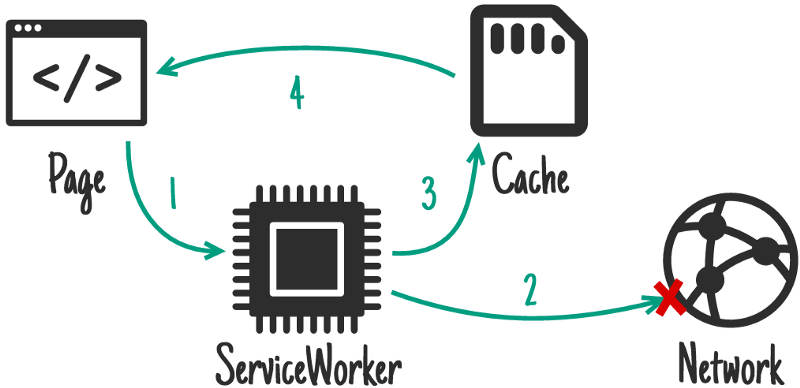
看了这个可能还是不太明白究竟是干嘛的,那就看看这张图吧,很形象,它表示sw处于Network First状态下,且网络不可用的流程图。
当我们配置好sw之后,它其实是一种javascript工作线程,他会在浏览器后台独立与网页运行。
现在它已经具备推送通知,后台同步等功能,但我主要使用了它的拦截处理网络请求以及缓存管理。
如何写一个service-worker.js
- 可以参照google service-workers 文档手动写一个
- 使用workbox手动配置
- sw-precache用于静态缓存,sw-toolbox用于动态缓存
这些都是不错的选择~
由于本网站是基于webpack构建,其生成的静态文件名附带hash值,若要手动添加至文件列表十分emmm麻烦
所以就采用了sw-precache-webpack-plugin这个webpack插件。(后面介绍)
如何注册一个service worker
if ('serviceWorker' in navigator) {
    navigator.serviceWorker.register('/service-worker.js') // 这个文件之后介绍
      .then(function (registration) {
        console.log('%cServiceWorker registration successful 🍭', 'color: #4CFF80');
      })
      .catch(function (err) {
        console.log('ServiceWorker registration failed: ', err);
      });
  }
检测一下浏览器是否支持sw,然后注册一下,嗯,就ok了。
顺带一提,如果是应用在公司或其他比较重要的项目时,建议在注册之前先向服务器请求一下,在服务端设置一个开关
这样保证了如果sw爆炸了或者有bug可以在远程控制,让客户端
Unregister(+1秒)
如何配置webpack插件
配置webpack插件其实也很简单:
const SWPrecacheWebpackPlugin = require('sw-precache-webpack-plugin')

...
plugins: [
...

  new SWPrecacheWebpackPlugin({
    cacheId: 'Reincarnation',
    filename: 'service-worker.js',
    staticFileGlobs: ['dist/**/*.{js,html,css,svg,png,jpg}'],
    minify: true,
    stripPrefix: 'dist/'
  })
]
这里主要关心一下 staticFileGlobs 这个参数,它控制了静态缓存,可以匹配dist目录下所有的js,html,css,svg,png等东西,当打开网站的时候,sw会自动向服务器请求这些数据并缓存起来。
那么,动态获取的数据怎么办呢? 就像本站会向后端获取一些文章,状态等信息,这些请求是动态的,就需要借助toolbox了,在这里可以向这个插件添加一个字段实现!
new SWPrecacheWebpackPlugin({
  cacheId: 'Reincarnation',
  filename: 'service-worker.js',
  staticFileGlobs: ['dist/**/*.{js,html,css,svg,png,jpg}'],
  minify: true,
  stripPrefix: 'dist/',
  runtimeCaching: [
    {
      urlPattern: /^https:\/\/say\.moe\/api\/.*/,
      handler: 'networkFirst'
    },
    {
      urlPattern: /^https:\/\/moudicat-data\.oss-cn-beijing\.aliyuncs\.com\/cdn\/.*/,
      handler: 'cacheFirst'
    }
  ]
})上面的例子中,say.moe/api是后端的接口, moudicat-data.oss-cn-beijing.aliyuncs.com/cdn 是一些放在oss上的静态文件。
对于这两种需要动态获取的资源,我们需要用不同的策略:
比如后端接口应该是实时刷新的,所以给了一个
networkFirst。这样以来就可以通过下列的步骤进行缓存。
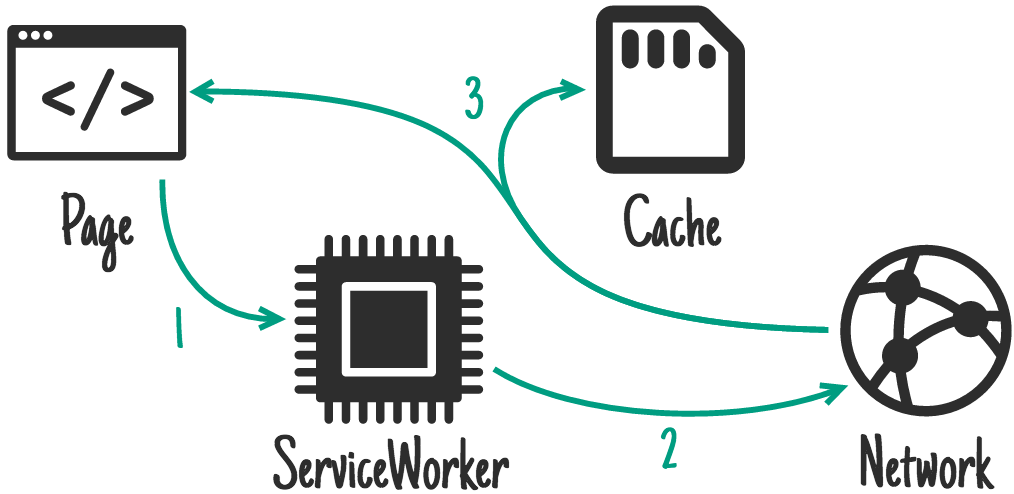
而cdn上的资源大部分时间是不会修改的,这时候就可以用到
cacheFirst
若需要最快加载且变更不重要可以采用
Fastest (Stale-while-Revalidate)
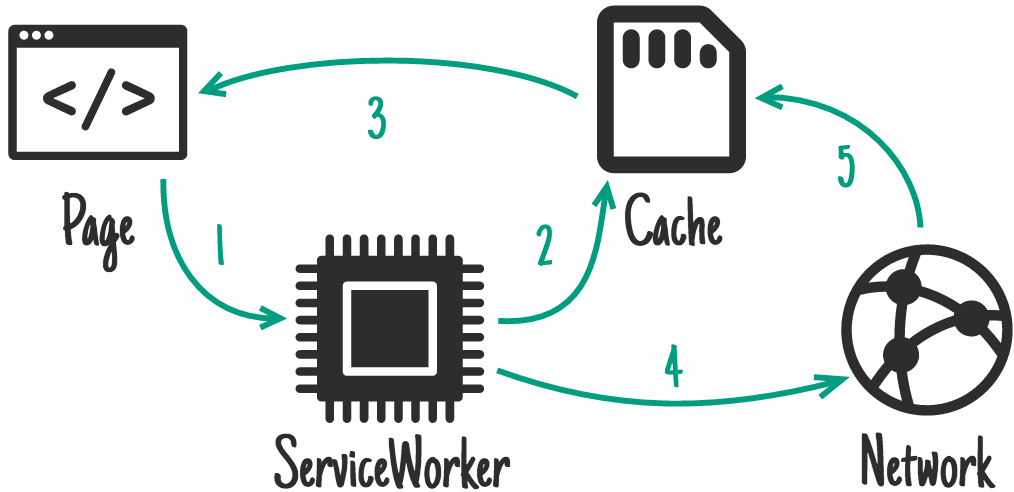
引述官方文档
toolbox.networkFirst
Try to handle the request by fetching from the network. If it succeeds, store the response in the cache. Otherwise, try to fulfill the request from the cache. This is the strategy to use for basic read-through caching. It’s also good for API requests where you always want the freshest data when it is available but would rather have stale data than no data.
toolbox.cacheFirst
If the request matches a cache entry, respond with that. Otherwise try to fetch the resource from the network. If the network request succeeds, update the cache. This option is good for resources that don’t change, or have some other update mechanism.
toolbox.fastest
Request the resource from both the cache and the network in parallel. Respond with whichever returns first. Usually this will be the cached version, if there is one. On the one hand this strategy will always make a network request, even if the resource is cached. On the other hand, if/when the network request completes the cache is updated, so that future cache reads will be more up-to-date.
toolbox.cacheOnly
Resolve the request from the cache, or fail. This option is good for when you need to guarantee that no network request will be made, for example saving battery on mobile.
toolbox.networkOnly
Handle the request by trying to fetch the URL from the network. If the fetch fails, fail the request. Essentially the same as not creating a route for the URL at all.
测试
到此为止,sw的配置已经基本完成了,这时候运行yarn build试试吧!
Build之后会看见dist目录中,出现了一个文件,这个文件就是文章中注册那一节的js。
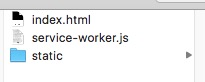
现在打开页面见证奇迹(
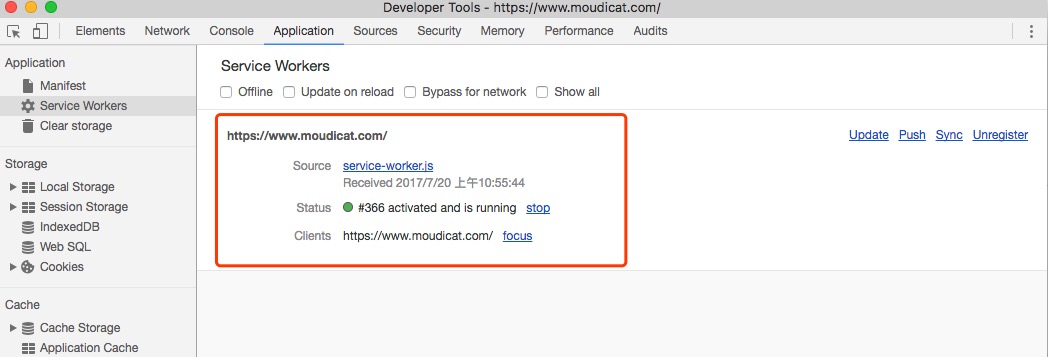
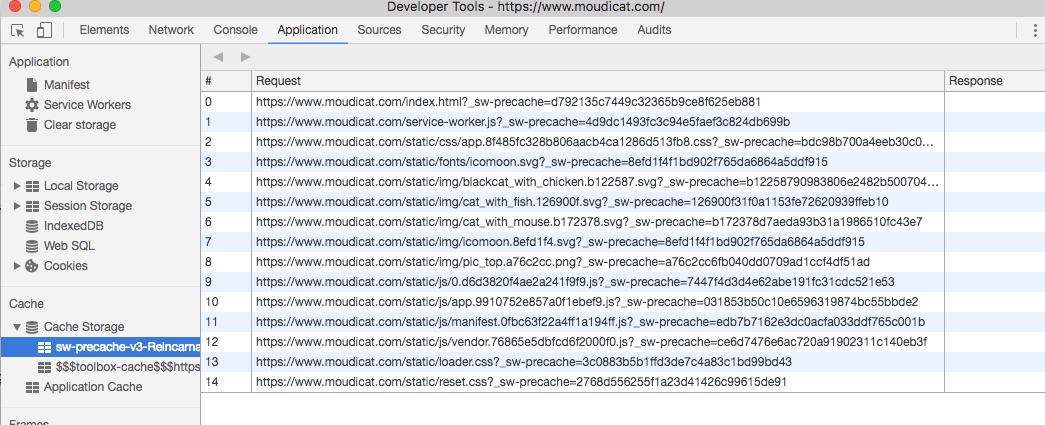
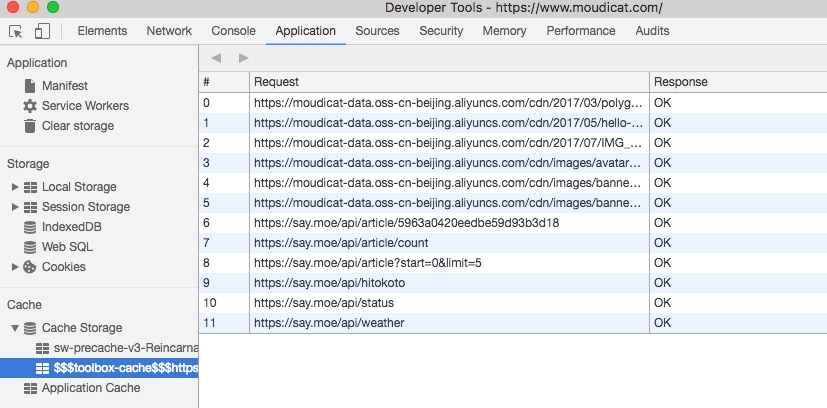
可以看到,当浏览器成功访问之后,就在本地建立了缓存,那么我们试试刷新页面,看看network情况。
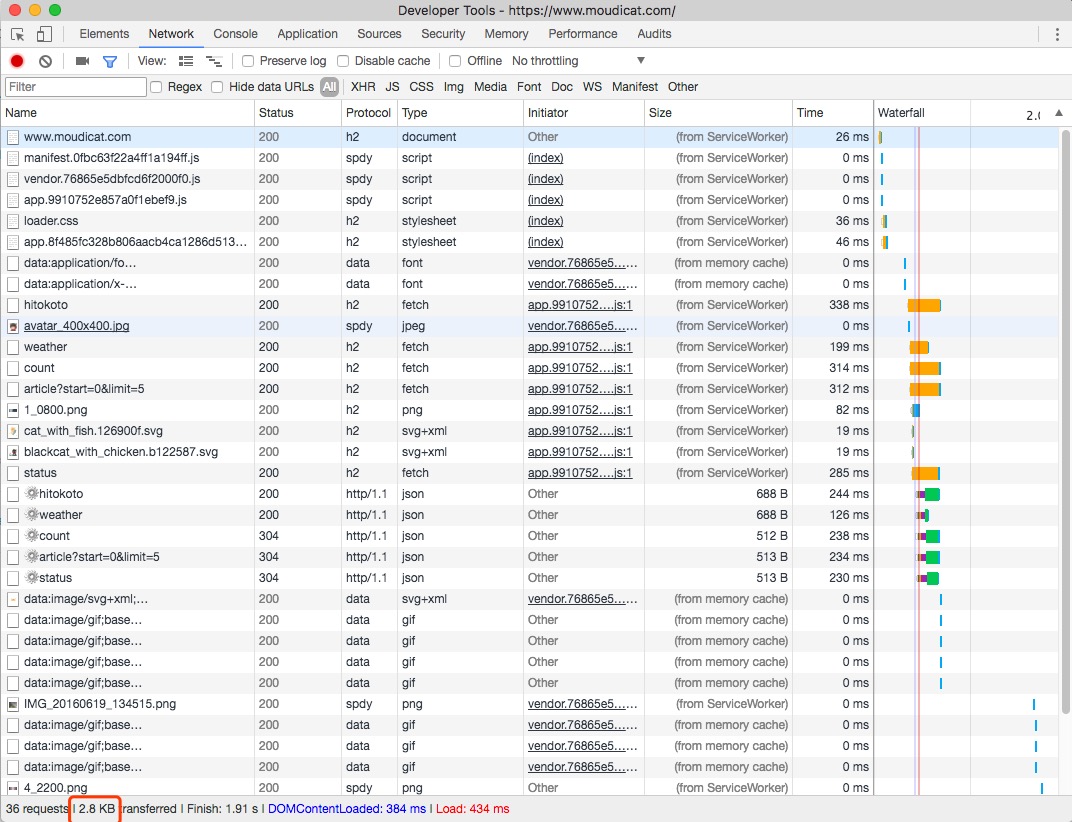
好了基本所有的关键资源都写着from ServiceWorker 只有几个接口请求了网络,所以最后使用网络流量仅有2.8KB!
那我们试试掐掉网线!.... 好吧,我们还是简单些,打开network界面上的offline测试一下(
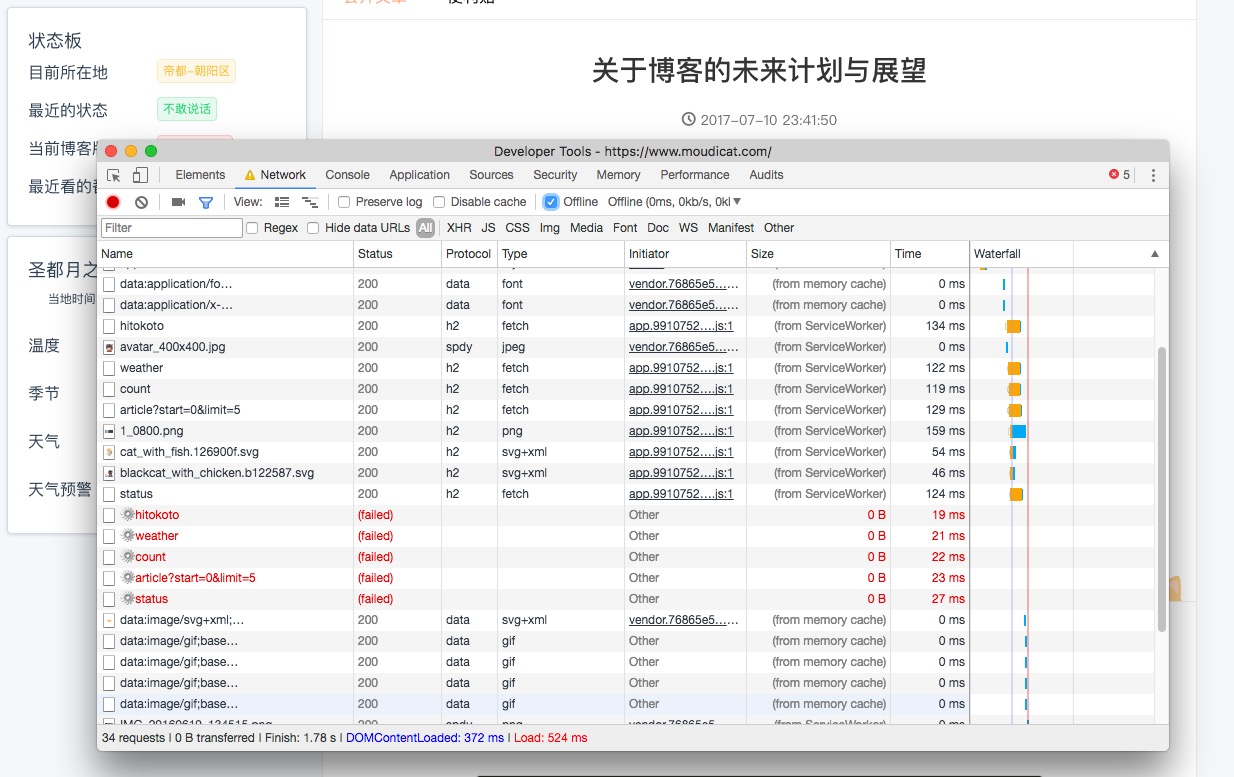
可以看到。即使断网了!我也要用这腐朽的声音喊出: 我tm还没死! --鲁迅
后记
这篇文章大概就到这里了, 其实sw还有很多的功能,很多种模式,待我们慢慢研究吧。。
捡到了漂流瓶!
根据《非经营性互联网信息服务备案管理办法》,小岛暂不开放公开留言 / 评论。
想和我聊聊的话,欢迎通过其他渠道找我~